
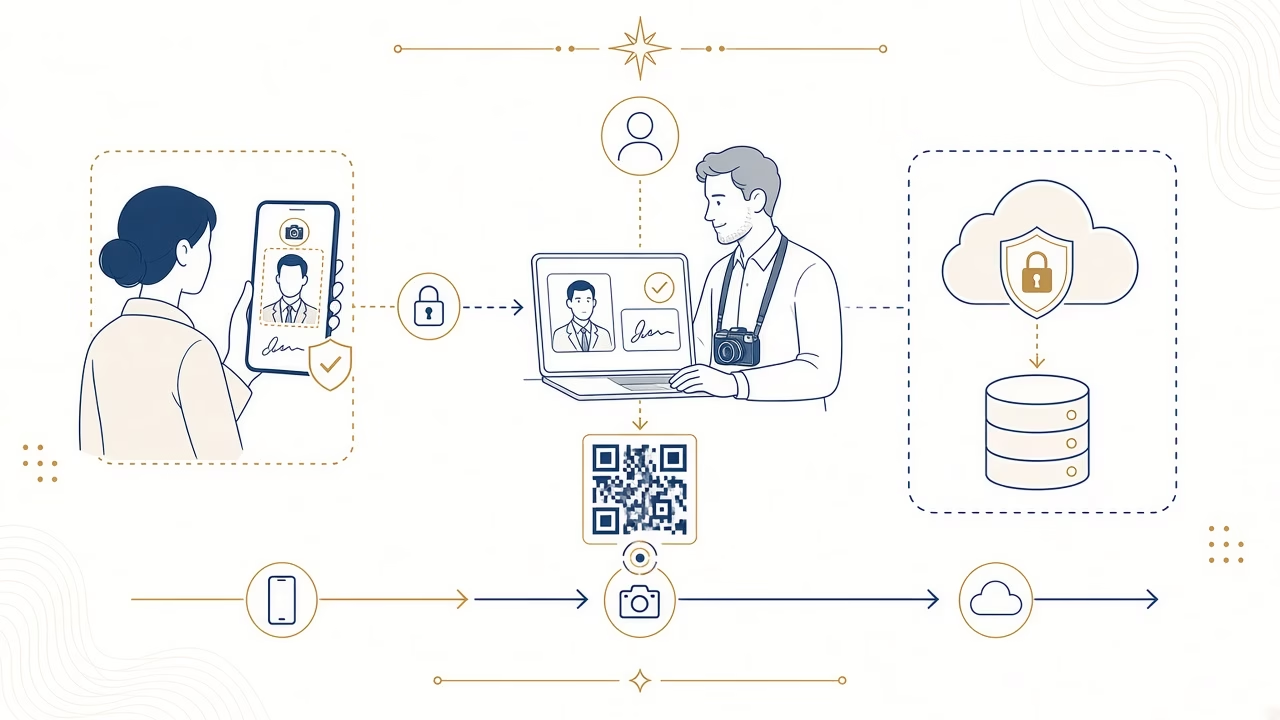
The crucial correction is that citizens cannot upload a phone photograph directly to the official myPhoto service. The official upload is performed by an authorised professional photographer. Panorama’s mobile application or form is a separate intake channel through which a customer sends a photograph and, when relevant, a signature to that photographer. It is not a government platform and bypasses none of the official steps.
What Panorama’s mobile intake does
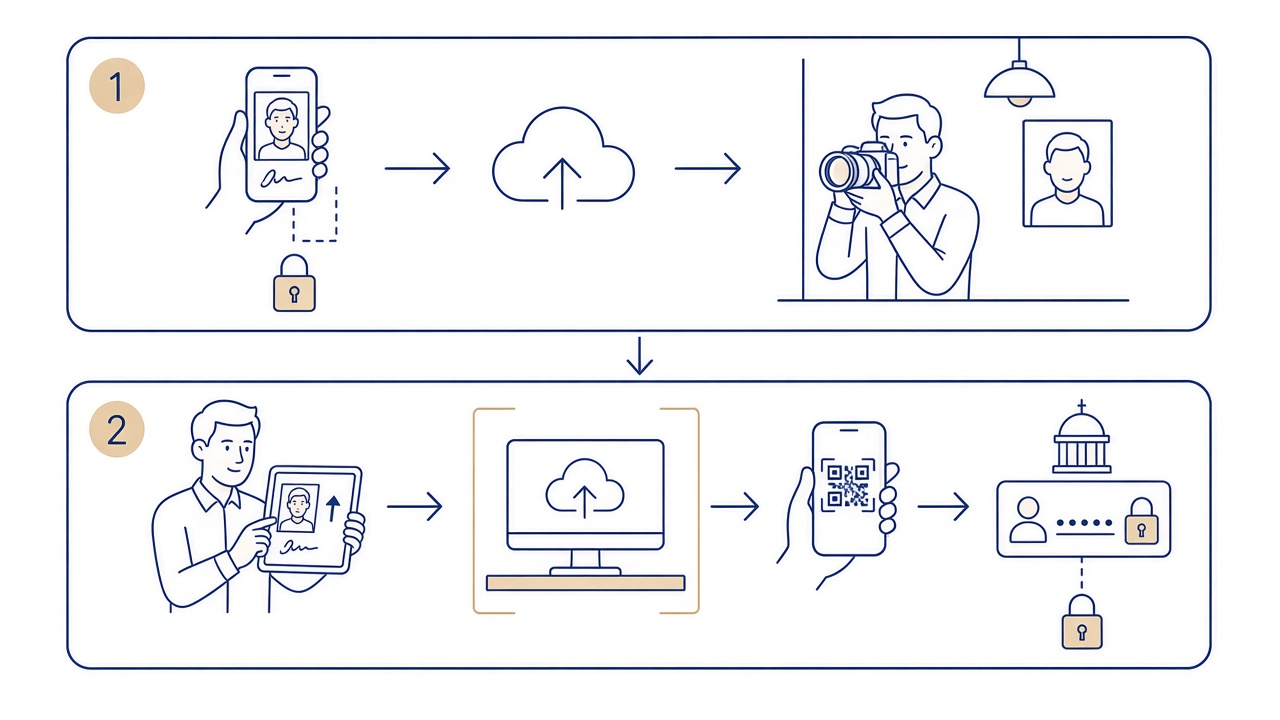
The route helps people abroad, away from Volos or otherwise unable to attend the studio easily to send initial material. The authorised photographer receives the file, checks whether it can be prepared for the stated purpose and personally carries out the official myPhoto upload when the requirements can be met.
It does not turn every selfie into an acceptable official image. A file with lens distortion, insufficient resolution, filters, heavy shadows, hidden features or an unsuitable background may need to be retaken. The route cannot guarantee that a public authority will accept the material or issue a document.
Before taking the photograph
Clean the lens and use the phone’s main camera rather than a social-media application. Ask another person to hold the device, because a close selfie can distort the nose, forehead and outline. Place the camera roughly at eye level and keep enough distance to include the head and shoulders without wide-angle exaggeration.
Stand before a plain pale background, leaving space from the wall to reduce shadows. Use even daylight or soft frontal illumination. Avoid a bright window behind you, direct sunshine, light arriving from only one side and a ceiling lamp that leaves the eyes dark.
Look straight ahead, keep a natural neutral expression and leave the complete face visible. Remove spectacles if they create glare and move hair away from the eyes. Do not use a filter, beauty mode, artificial portrait blur or an application that changes skin and facial features.
How to send the file
- Open Panorama’s published page for the service and read the current instructions.
- Enter accurate contact details and identify the public purpose for which myPhoto is needed.
- Select the original camera file, not a screenshot or an image downloaded from a chat.
- If the procedure concerns a driving licence, follow the signature instructions; do not assume a signature is needed for other purposes.
- Review the preview, terms and privacy information before submitting.
The current route and detailed guidance appear on the page for myPhoto from abroad and the new mobile application. Use that published page rather than an old saved form or an unfamiliar third-party link.
Supplying a signature by phone
Within official myPhoto, the signature is used only for issuing or renewing a driving licence. If that is your purpose, follow the instructions for a clean, complete signature without added wording, a date or a drawing. It must be your own signature.
Do not supply a signature for an unrelated procedure. A signature is particularly sensitive personal material, so it should not be photographed on a document that exposes unrelated data or sent through an unapproved channel. Read the privacy notice and limit the file to what the process genuinely requests.
Quality review and a possible retake
The photographer assesses whether the material permits faithful, technically suitable preparation. Processing must not change identity. Controlled cropping, brightness adjustment and technical export may be possible, but missing features cannot be invented and the face must not be rebuilt or artificially smoothed.
A retake may be requested when the image is blurred, heavily compressed, very dark, angled or filtered. The same applies if the face sits too close to an edge, there is no shoulder area for a proper crop or the background merges with hair and skin. This quality review protects accuracy; it is not a promise of administrative acceptance.
What happens after official upload
Once the authorised photographer completes the official upload, you receive a code or QR by SMS or email. You, rather than the photographer, then sign in using Taxisnet and the required second factor. Preview the material and associate it with your AFM.
The final substantive myPhoto step is explicitly authorising the particular supported public service that needs to retrieve the photograph and, only for a driving licence, the signature. AFM association alone is not that authorisation, and receiving the code does not complete the wider administrative application.
Privacy and security
- Upload only through Panorama’s published page and check the web address.
- Never send Taxisnet credentials, one-time codes or a whole identity document unless a lawful, explicit request explains why it is needed.
- Use the original file and avoid public or shared Wi-Fi where practicable.
- Read the stated purpose, retention information and contact details in the privacy notice.
- Keep the resulting code or QR private and sign in only through gov.gr.
Official information is available through the gov.gr myPhoto page for citizens and the National Registry of Administrative Public Services. Panorama’s private intake takes place before those citizen actions and does not replace them.
What this route cannot bypass
Mobile intake cannot remove the authorised photographer from the official upload, replace Taxisnet authentication or associate material with an AFM on the citizen’s behalf. It cannot authorise an authority automatically, waive supporting documents or override the public service’s final decision.
It also cannot recover detail that a poor source never captured. Sending a full-resolution original gives the photographer the best opportunity to assess crop, lighting and background, but a technically weak or inaccurate photograph still requires another capture. Convenience must not be confused with exemption from quality requirements.
Panorama Studio has operated in Volos since 1989 and is an authorised myPhoto photographer. That status identifies who performs the official upload; it does not convert the separate phone intake into an official state application or guarantee acceptance.
Frequently asked questions
Can I upload directly to official myPhoto?
No. You send material to the authorised photographer, who performs the official upload.
Is Panorama’s application the myPhoto service?
No. It is a separate file-intake channel for the photographer. The government service and all official citizen steps remain distinct.
Can I send a selfie?
A close selfie often distorts the face. Prefer another person using the main camera at eye level, from a sensible distance and without filters.
What if my photograph is unsuitable?
The photographer may request a retake. An image lacking accurate detail should not be artificially rebuilt to force it through the process.
When should I send a signature?
Only when the procedure concerns issuing or renewing a driving licence, and only in accordance with the specific instructions.
Must I disclose Taxisnet credentials?
No. You sign in personally after upload. Never disclose your username, password or second-factor code to the photographer.
What arrives after the photographer uploads?
A code or QR arrives by SMS or email, allowing you to continue with sign-in, preview and association.
Is AFM association sufficient?
No. You must also explicitly authorise the particular supported public service to retrieve the material.
Does mobile intake guarantee acceptance?
No. It bypasses no specification or check. The responsible public service makes the final administrative decision.
Can I use the route from abroad?
Yes, that is one of its main purposes, provided you follow the current instructions and the photographer can approve the source quality.
Send your material through the correct route
Panorama Studio, an authorised myPhoto photographer in Volos since 1989, can review your files. Read the mobile intake guide or contact us.



