

Organising thousands of photographs begins with protection, not deletion. Before touching duplicates, screenshots or old albums, establish where the originals live and whether a second copy has actually been checked. From there, a plain structure based on dates, events and favourites is enough. A short monthly review is more effective than an exhausting clean-up abandoned halfway through.
Ten practical steps
Copy before any clean-up
Create a second accessible copy and open sample files before deleting because synchronisation can also propagate a mistake. In practice, “Copy before any clean-up” should become a habit within the organising workflow, not a last-minute repair. Notice what changes before and after the choice, then retain the version that serves the photograph clearly within “Copy before any clean-up”.
Map every source
List phones, cards, computers, conversations and services containing pictures so that you do not import everything blindly twice. The aim of “Map every source” is not perfection but a dependable decision within the organising workflow. If two options seem equal, favour the one retaining more information and leaving scope for future use within “Map every source”.
Cautious clutter removal
Begin with expired screenshots, obviously blurred tests and unusable frames, checking the bin before permanent deletion. Give “Cautious clutter removal” particular attention within the organising workflow, because small details are easily missed on a compact screen. A deliberate look at faces, edges and information prevents avoidable correction later within “Cautious clutter removal”.
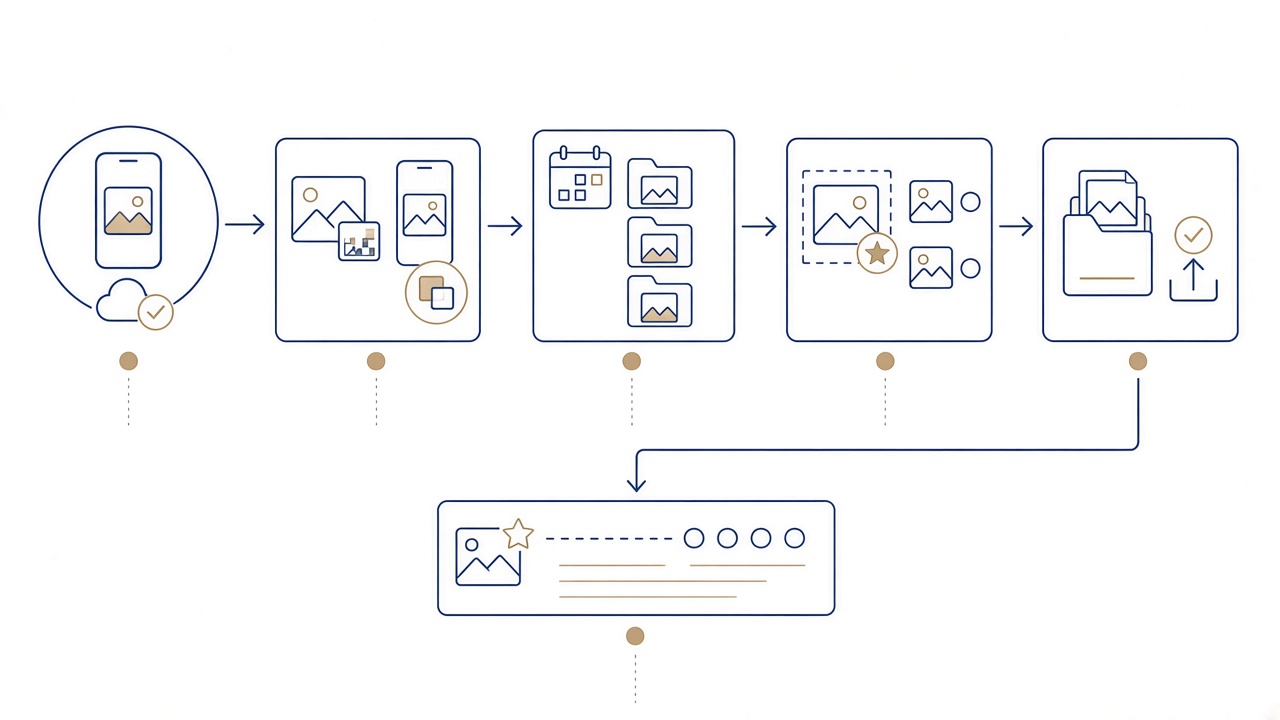
Duplicate review
Treat automatic detection only as a suggestion and compare resolution, editing, date and size before merging. For “Duplicate review” to work within the organising workflow, avoid bulk automatic choices when the material has personal value. Test one representative case and judge the actual result rather than trusting an application status alone within “Duplicate review”.
A few useful albums
Create simple categories for year, event, trip or person instead of a deep structure nobody remembers to follow. Consistency in “A few useful albums” is more useful than a complicated technique within the organising workflow. Choose a rule you can remember, but allow exceptions when the story or safety of a particular picture demands one within “A few useful albums”.
Date together with event
Names such as 2026-08 Pelion Holiday sort naturally and explain contents better than vague folders labelled miscellaneous. If “Date together with event” feels difficult within the organising workflow, divide the decision into observation, one small action and review. That order reduces haste and makes it easier to identify which change genuinely improved the outcome within “Date together with event”.
Favourites as a shortlist
Mark only pictures you would show, print or place in an album, not hundreds of nearly identical frames. Do not judge “Favourites as a shortlist” only by the most striking example within the organising workflow. Ask whether the same approach works for ordinary pictures and whether another person could understand it without extra explanation within “Favourites as a shortlist”.
Metadata caution
Dates, locations and captions help but may be wrong or sensitive; correct with evidence and remove location before public sharing. “Metadata caution” still requires human judgement within the organising workflow, even when a device offers an automatic answer. Technology can accelerate a task, but it cannot know which person, event or detail carries family meaning within “Metadata caution”.
Export originals
Periodically copy originals at their initial quality into an organised local folder and confirm that transfer completed. Before considering “Export originals” complete within the organising workflow, view the result from the perspective of someone encountering it later. Will they understand the moment, receive enough information and feel the people were treated respectfully specifically for “Export originals”?
A small monthly routine
Set a short regular time for copying, decluttering, naming and favourites instead of a rare, risky mass clean-up. Finish “A small monthly routine” with a deliberate final choice within the organising workflow. Do not retain or share every variation by habit; a smaller considered set is easier to protect, retrieve and enjoy within “A small monthly routine”.
Before ending the monthly session
- A second verified copy exists before deletion.
- Duplicates were compared for resolution, editing and date.
- Albums use a small number of understandable names.
- Favourites form a genuine shortlist.
- The next monthly review has a specific date.
Finish each small batch before opening the next: verify its copy, give it a clear name, mark favourites and record any unresolved question. This keeps progress visible and prevents half-finished folders that demand the same investigation again later.
Frequently asked questions
Should I delete anything before the backup completes?
The practical answer is this: create a second accessible copy and open sample files before deleting because synchronisation can also propagate a mistake.
How do I distinguish true duplicates from similar frames?
In this situation, list phones, cards, computers, conversations and services containing pictures so that you do not import everything blindly twice.
Which screenshots are worth keeping?
As a safe starting point, begin with expired screenshots, obviously blurred tests and unusable frames, checking the bin before permanent deletion.
Do I need both a folder and an album for one event?
To avoid a common mistake, treat automatic detection only as a suggestion and compare resolution, editing, date and size before merging.
How can I correct a wrong date without losing information?
In everyday use, create simple categories for year, event, trip or person instead of a deep structure nobody remembers to follow.
Is it safe to remove location data?
When the material has particular value, names such as 2026-08 Pelion Holiday sort naturally and explain contents better than vague folders labelled miscellaneous.
What does exporting an original rather than a viewing copy mean?
Before changing a setting, mark only pictures you would show, print or place in an album, not hundreds of nearly identical frames.
Where should pictures live after I clear the phone?
When comparing two options, dates, locations and captions help but may be wrong or sensitive; correct with evidence and remove location before public sharing.
How long should a realistic monthly routine take?
For a consistent result, periodically copy originals at their initial quality into an organised local folder and confirm that transfer completed.
How do I make a short print selection?
The essential test is that: set a short regular time for copying, decluttering, naming and favourites instead of a rare, risky mass clean-up.
Finished your favourites shortlist and need help with size or cropping? Talk to Panorama Studio in Volos, working with photography since 1989 and ready to discuss “How to Organise Thousands of Photos on Your Phone”.



