
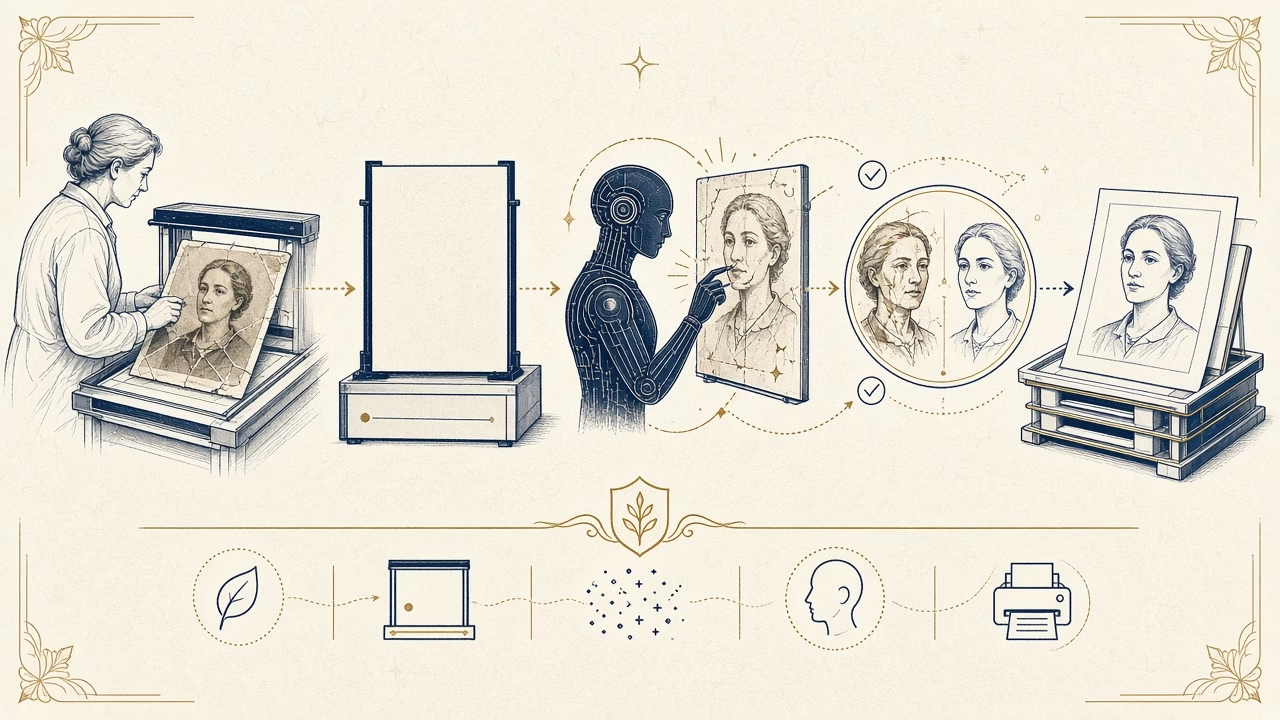
AI old-photo restoration can remove dust, reduce small scratches and make a worn portrait easier to read. It can also alter a face, textile, inscription or historic atmosphere in a way that looks convincing but is false. The central question is not simply whether the picture appears “better.” We need to know which changes are supported by evidence, which are interpretations, and which file remains the historical reference.
Scan and preserve before using AI
Do not process the only file or hurriedly photograph a reflective print when it can be scanned safely. Clean only with a method appropriate to the object; never rub a fragile surface. Record front, back, edges and handwritten notes. Capture at true optical resolution and retain an unprocessed master. Extremely fragile, stuck, flaking or mould-affected items belong with a conservator rather than an experimental scanning session.
Keep the master unchanged and backed up, then create a working copy. This follows archival practice that separates preservation captures from production or restoration derivatives. It lets a future operator return to the original recording, test improved software and demonstrate which changes were introduced later. A high-quality scan is not a substitute for caring for the physical photograph, but it is the foundation of responsible digital work.
Where automated tools can help
For repetitive dust, mild noise, fine scratches and some creases, AI can accelerate a first cleanup. Automated subject selections can help build local masks, and upscaling may provide smoother edges for a defined print size. Inspect every output both close up and at normal viewing distance, because the model may erase genuine texture along with damage or turn film grain into waxy surfaces.
The strongest role is controlled assistance. Begin with restrained tonal correction, repair larger losses with reference to neighbouring evidence, and apply AI on a separate layer or derivative. In group photographs inspect every face, not only the central subject. Treat uniforms, jewellery, signs and architecture conservatively because small invented forms may change historical meaning even when the overall image looks attractive.
Hallucination and facial reconstruction
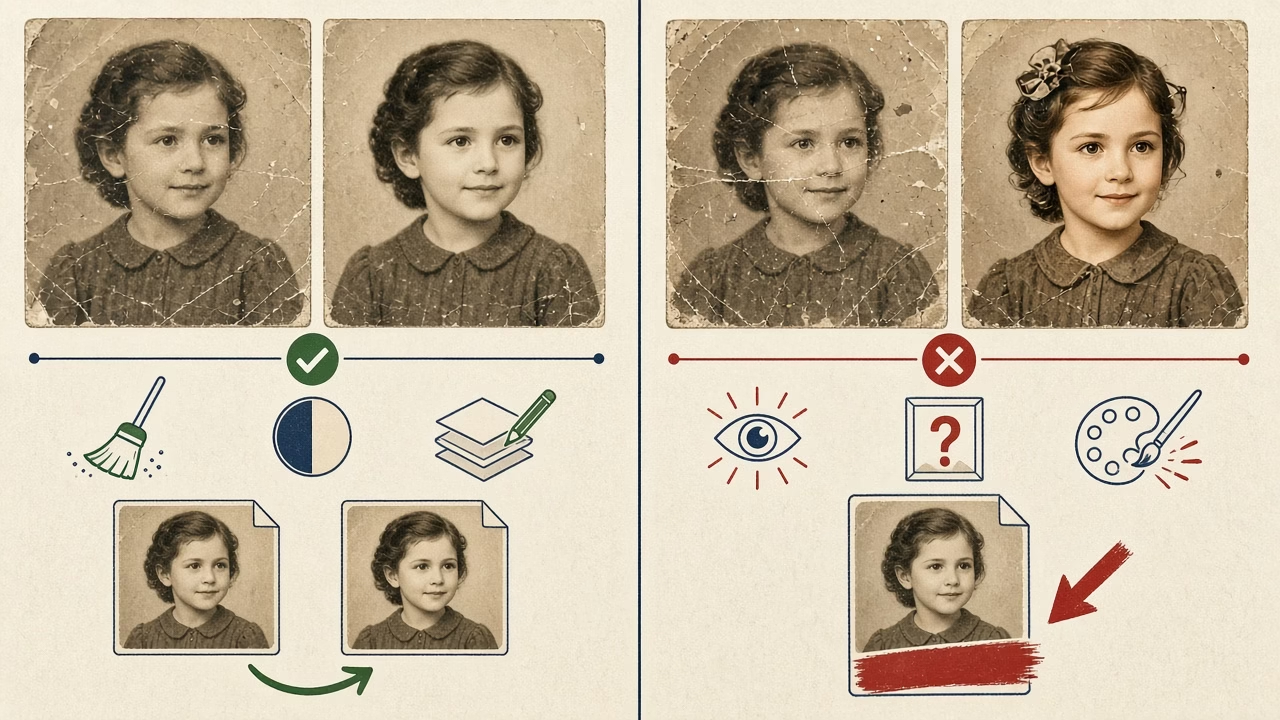
A model does not remember the subject’s real eyes or teeth. It predicts patterns that appear plausible based on its training and settings. Where the source is blurred or missing, it may alter age, expression, symmetry, hairstyle and family resemblance. Crisp output does not increase certainty; it can merely render a guess with greater confidence and visual polish.
Maintain separate versions: a neutral restoration limited to supported corrections and, if wanted, a creative reconstruction explicitly labelled as such. Do not use the latter as evidence of identity or fine detail. Other photographs from the same period can guide choices, yet additions should still be documented. Uncertainty is meaningful information, and preserving it is more honest than filling every gap.
Colourisation is interpretation
A monochrome image records brightness, not the full original hue. Different colours can produce similar grey values, so automatic colourisation proposes a possible palette rather than uncovering hidden colour. Research into clothing, location, insignia and family testimony can improve an interpretation, but cannot turn every colour choice into fact.
Deliver the restored monochrome version as well and label the colourised derivative. Avoid anachronistically modern saturation without a reference. Transparency is especially important for museum, journalistic and genealogical uses. A family gift may reasonably choose a more creative treatment, provided the documentary capture and the contemporary visual interpretation are never confused or silently substituted for one another.
Reversible workflow and print proof
Clear folders such as scan_master, restoration_neutral and colorized_interpretation prevent confusion. Retain layers or intermediate versions, note the tool and date, and never overwrite the master. If an online AI service is used, review storage, model-training and deletion terms, especially for sensitive family portraits. Software policies can change, so check the current terms at the moment of submission.
A bright display can hide or exaggerate defects. Before a final large print, produce a proof at actual scale and inspect skin, eyes, repaired edges, grain, shadows and neutrals. The best restoration is not necessarily the smoothest one. It should retain character, withstand reproduction on paper and be accompanied by an honest explanation of substantial interventions.
Frequently asked questions
Can AI recover the subject’s real face?
It can enhance visible features, but where source evidence is missing it predicts plausible details. Such reconstruction should not be presented as certain identity, expression or historically exact facial information.
Should the original scan always be kept?
Yes. Preserve an unprocessed master with backups and make derivatives from it. Without that reference, review becomes difficult and every future technique must begin from an already altered image.
Is automatic colourisation accurate?
Not necessarily. Monochrome brightness does not encode a unique original hue for each area. Colourisation is a researched or creative interpretation and should be labelled clearly.
Which defects are often suitable for automated repair?
Dust, fine scratches, mild noise and limited tears can respond well. Large losses in faces, writing or repeating patterns demand closer judgement, manual review and an explicit statement of uncertainty.
Does AI upscaling add real detail?
It adds calculated pixels and plausible texture. This may improve a print visually, but cannot prove eyelashes, lettering or fabric patterns that were absent from the recorded source.
When is a conservator needed instead of scanning?
Seek advice when an object flakes, carries mould, is adhered to a dangerous support, is exceptionally fragile or uses an unfamiliar historic process. Digital restoration cannot stabilise the physical artefact.
Can any online application receive a family portrait?
First review privacy terms, retention, model-training use and deletion controls. Sensitive portraits may warrant controlled local processing or a provider with contractual protections appropriate to the collection.
Why retain layers and intermediate versions?
They support reversal, comparison and adjustment without another destructive edit. They also document which areas came from manual retouching, filters, generative tools or source evidence.
When has a restoration gone too far?
Warning signs include erased natural grain, changed anatomy, uniformly smoothed age marks and confident inventions in uncertain regions. Visual plausibility and increased sharpness are not proof of authenticity.
Why make a print proof?
Paper, scale and reflected light expose halos, artificial skin, blocked shadows and inconsistent repairs that may go unnoticed on a luminous display. A proof allows correction before the final enlargement.
Sources and further reading
- NARA/FADGI: Technical Guidelines for Digitizing Cultural Heritage Materials
- National Archives: Digital Photographic Records
Follow us



Digitise and protect your archive
Have an old photograph that needs careful work?
We can assess the original, recommend an appropriate scan and distinguish conservative restoration from creative reconstruction. The scope and quotation depend on the damage and intended use.



